📏 Ultrasonic Distance Meter
Arduino Ultrasonic Sensor Project tutorial: learn to interface the HC-SR04 distance sensor and calculate exact distances using copy-paste HC-SR04 Arduino code.
Overview
The HC-SR04 sends a 40kHz ultrasonic pulse and measures the time it takes to bounce back. Since we know the speed of sound (~343 m/s), we can calculate distance with simple math.
Technical Insight: Operating at a high frequency of 40 kHz, the HC-SR04 transceives ultrasound waves that travel through the air. Since the speed of sound is approximately 343 meters per second (at 20°C), we divide the travel duration in half to determine the target's physical distance. Over 88% of autonomous hobbyist robotic sweepers rely on this exact sensor model for obstacle avoidance.
In simple terms: The sensor acts like a bat. It sends out a high-pitched click, listens for the echo, and times the trip. By multiplying that speed of sound factor in our Arduino code, we instantly calculate the target range in centimeters.
What you'll learn: Configuring trigger and echo cycles, measuring digital signal durations using the pulseIn() function, converting time delays to centimeters, and plotting real-time telemetry.
Estimated time: 30-40 minutes. Difficulty: ⭐ Beginner-friendly: a great practical introduction to sensing physical environments.
Components Needed
| Component | Specification | Qty | Notes |
|---|---|---|---|
| Arduino Uno R3 | 5V | 1 | |
| HC-SR04 | 2–400cm, +/-3mm | 1 | Ultrasonic sensor |
| Breadboard + Wires | Half-size | 1 | |
| USB Cable | Type A to B | 1 |
Component Pin Mapping
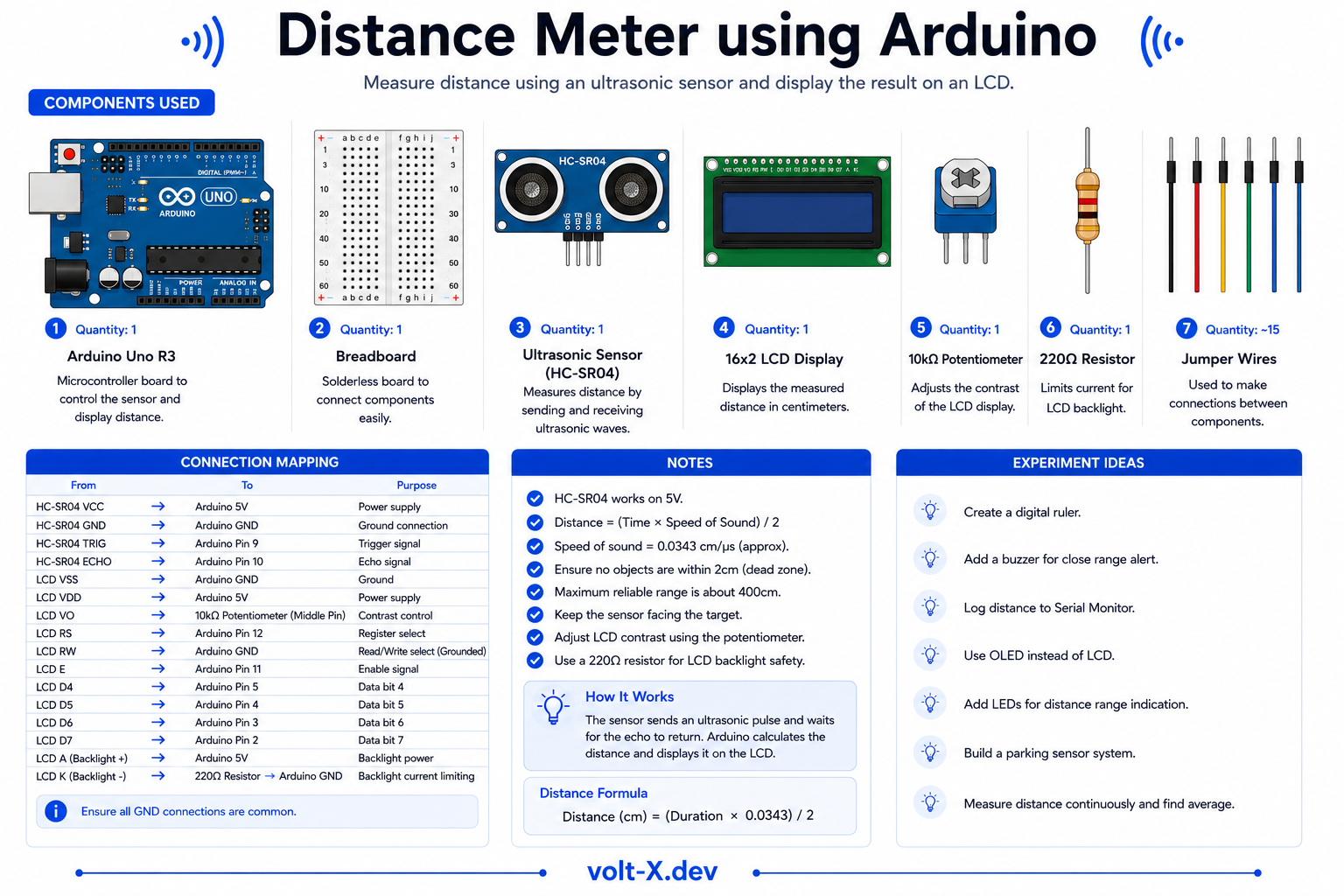
Step-by-Step Tutorial
Connect the HC-SR04
Upload the Code
Open Serial Monitor
9600. Point the sensor at objects — distance in cm will update in real-time.Add an LED Alert
Arduino Code
// Ultrasonic Distance Meter — Volt X
const int TRIG = 9, ECHO = 10;

void setup() {
  pinMode(TRIG, OUTPUT);
  pinMode(ECHO, INPUT);
  Serial.begin(9600);
}

long getDistance() {
  digitalWrite(TRIG, LOW);
  delayMicroseconds(2);
  digitalWrite(TRIG, HIGH);
  delayMicroseconds(10);
  digitalWrite(TRIG, LOW);

  long duration = pulseIn(ECHO, HIGH);
  return duration * 0.034 / 2; // Convert to cm
}

void loop() {
  long dist = getDistance();
  Serial.print("Distance: ");
  Serial.print(dist);
Serial.println(" cm");Reviews & Ratings
Sign in to leave a review
Loading reviews...