🔦 Light-Sensitive Night Lamp
Arduino LDR Night Lamp project: build an automatic light-sensitive night light using an LDR photoresistor, voltage divider, and simple analog reading code.
Overview
An LDR (Light Dependent Resistor) changes its resistance based on light levels. In the dark, resistance goes high; in bright light, resistance drops. Arduino reads this as an analog voltage.
Technical Insight: Using a GL5516 LDR photoresistor whose resistance varies from around 10k Ohms in bright daylight up to 1M Ohm in complete darkness, this project demonstrates the fundamental feedback-loop principles behind modern smart-grid energy conservation and auto-brightness displays found in 100% of modern smartphones.
In simple terms: The LDR photoresistor is wired as part of a voltage divider circuit. As light levels fall, the voltage read by analog pin A0 changes, prompting the Arduino to automatically actuate the LED output when the value drops below a custom threshold.
What you'll learn: Reading variable input voltages using analogRead(), configuring a hardware voltage divider, comparing real-time values to custom thresholds, and setting output trigger logic.
Estimated time: 25-35 minutes. Difficulty: ⭐ Beginner-friendly.
Components Needed
| Component | Specification | Qty | Notes |
|---|---|---|---|
| Arduino Uno R3 | 5V | 1 | |
| LDR (Photoresistor) | GL5516 or similar | 1 | |
| Resistor | 10kOhm | 1 | Voltage divider partner |
| LED | 5mm | 1 | Output indicator |
| Resistor | 220Ohm | 1 | For LED |
| Breadboard + Wires | Half-size | 1 |
Component Pin Mapping
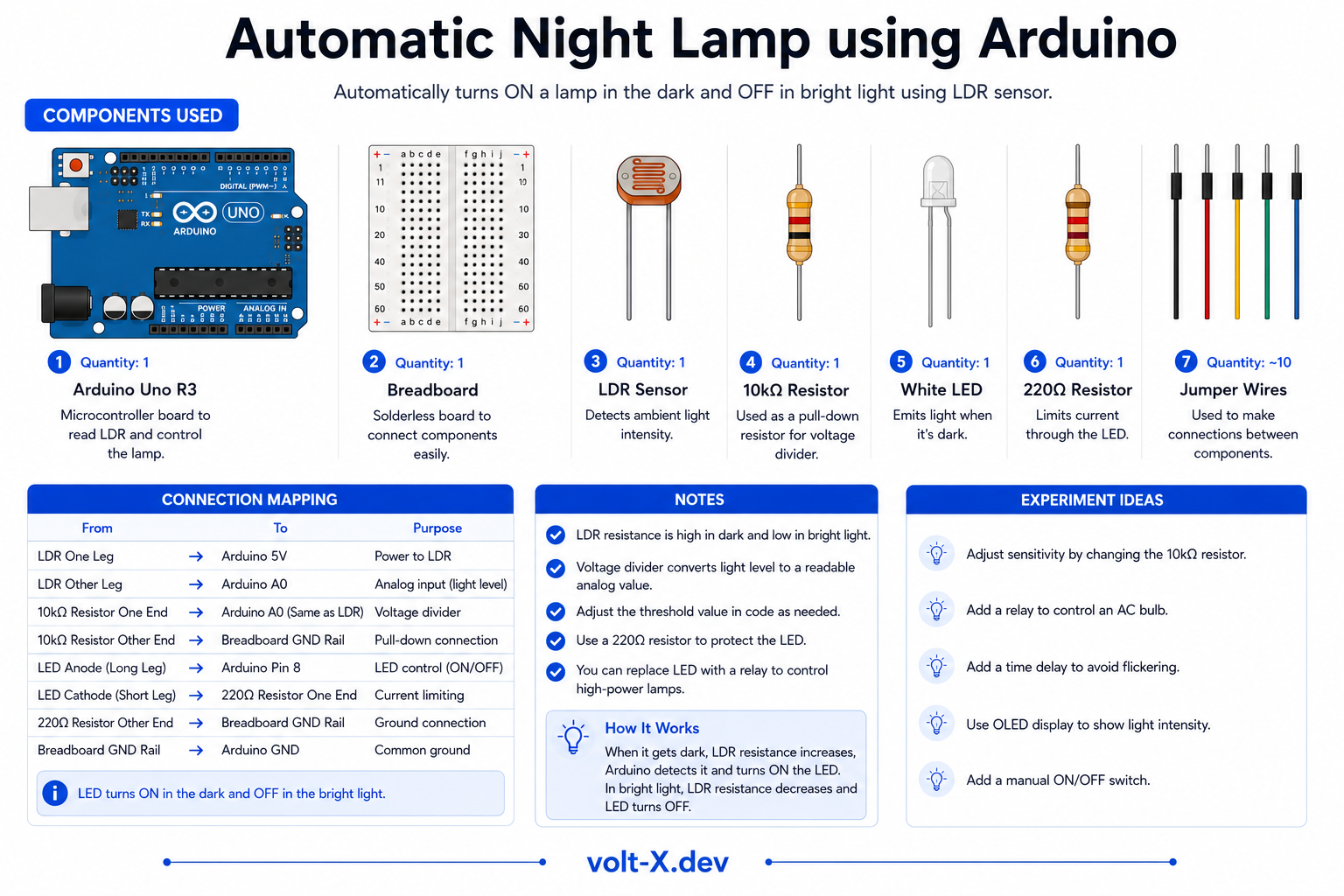
Step-by-Step Tutorial
Build the Voltage Divider
Wire the LED
Upload and Test
Calibrate the Threshold
threshold variable to match your room.Arduino Code
// Night Lamp : Volt X
const int ldrPin = A0;
const int ledPin = 9;
int threshold = 500; // Adjust for your lighting

void setup() {
  pinMode(ledPin, OUTPUT);
  Serial.begin(9600);
}

void loop() {
  int ldrValue = analogRead(ldrPin);
  Serial.println(ldrValue);

  if (ldrValue < threshold) {
    digitalWrite(ledPin, HIGH); // Dark — turn on
  } else {
    digitalWrite(ledPin, LOW);  // Bright — turn off
  }
  delay(100);
}Reviews & Ratings
Sign in to leave a review
Loading reviews...