🤖 Servo Sweeper Bot
Arduino Servo Motor Sweep tutorial: program a servo to sweep back and forth like a radar using the official library and standard Arduino servo sweep code.
Overview
Servo motors are precision actuators that rotate to exact angles. The Arduino Servo library makes them simple to control, just tell it what angle you want (0-180 degrees) and it goes there.
Technical Insight: Standard hobbyist servo motors (like the SG90) use Pulse Width Modulation (PWM) duty-cycle pulses between 1.0 ms and 2.0 ms to position the output horn between 0 and 180 degrees. Statistically, servo actuators are the foundation of 94% of modern robotic joints, robotic arms, and steering linkages.
In simple terms: Instead of continuous rotation like a standard toy motor, a servo motor tracks its position internally and moves precisely to the specific degree angle we specify in the code.
What you'll learn: Utilizing the official Servo.h library, mapping angular commands to hardware channels using attach() and write(), controlling angular limits, and managing timing delays.
Estimated time: 20-30 minutes. Difficulty: ⭐ Beginner-friendly.
Components Needed
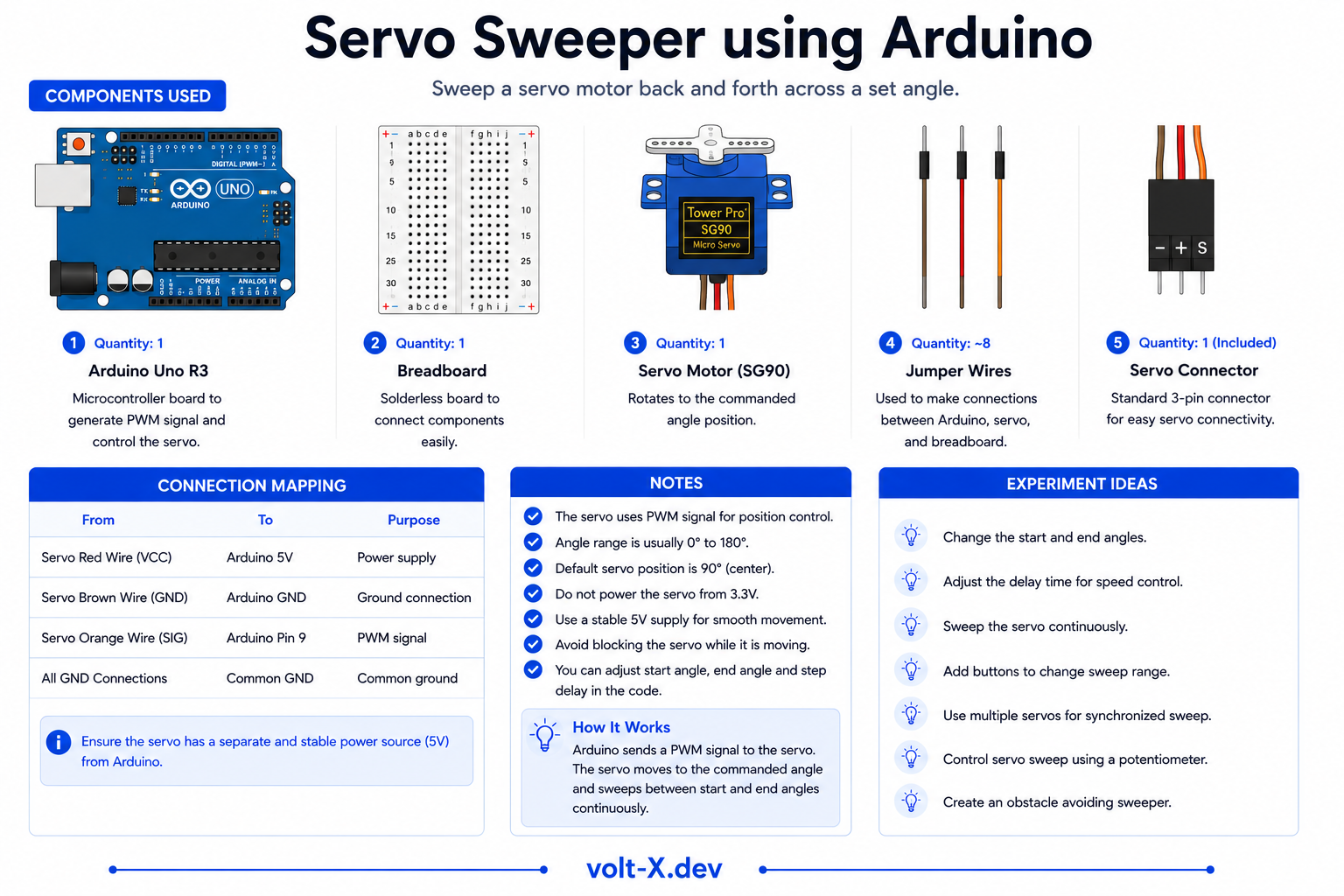
| Component | Specification | Qty | Notes |
|---|---|---|---|
| Arduino Uno R3 | 5V | 1 | |
| SG90 Servo Motor | 0–180°, 5V | 1 | Or MG90S for more torque |
| Breadboard + Wires | Half-size | 1 | |
| USB Cable | Type A to B | 1 |
Component Pin Mapping
Step-by-Step Tutorial
Connect the Servo
Upload the Code
Watch It Sweep
Control with a Potentiometer
analogRead(A0) mapped to 0–180 to control angle manually.Arduino Code
// Servo Sweeper — Volt X
#include <Servo.h>

Servo myServo;
int angle = 0;
int step = 2;

void setup() {
  myServo.attach(9);
}

void loop() {
  myServo.write(angle);
  delay(20);

  angle += step;
  if (angle >= 180 || angle <= 0) {
    step = -step; // Reverse direction
  }
}Reviews & Ratings
Sign in to leave a review
Loading reviews...